
Use the OSCAR protocol, compatible with AOL Instant Messenger, to communicate with your OpenClaw agents.

Install
openclaw plugins install clawhub:@ukozi/openclaw-oscaropenclaw-oscar
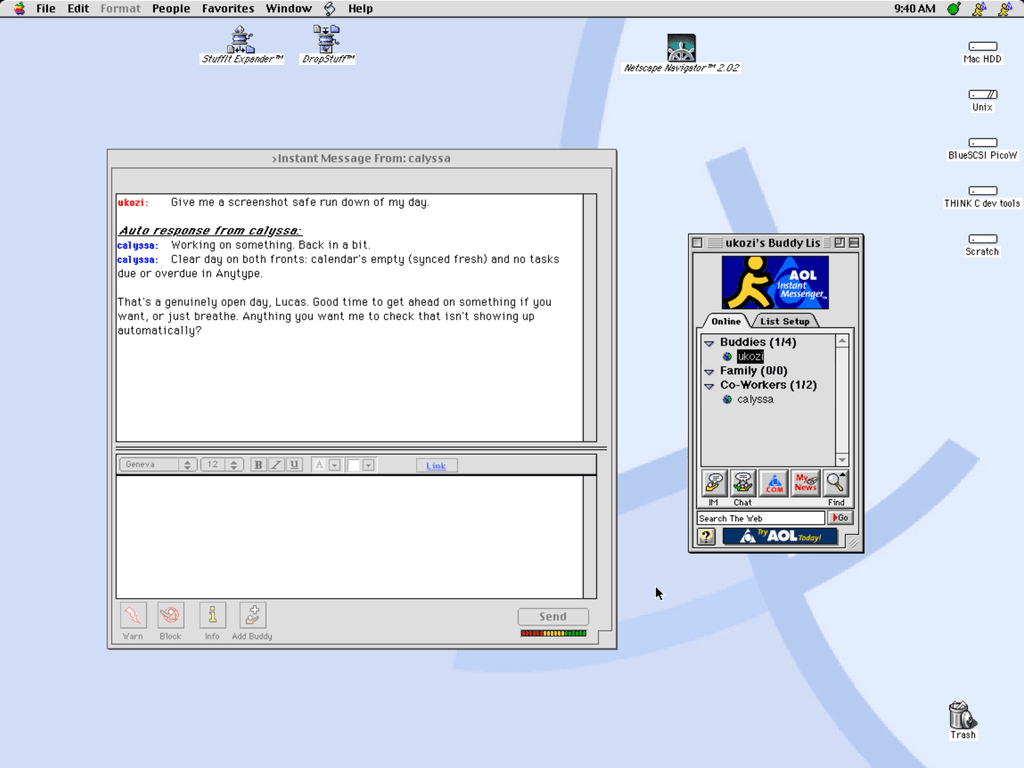
The plugin gives an OpenClaw agent a screen name on an Open OSCAR Server, so you can reach it from an instant messenger client instead of a terminal. Open OSCAR Server is compatible with AOL Instant Messenger clients.
Messages
Only people on the approved list can message the agent. Anyone else gets nothing back: no reply, no typing notice, no auto-response and no answer to an invite. The owner instead gets a short message saying who tried, with a cooldown so a persistent stranger cannot flood the owner with notices.
Rooms
The agent can sit in one chat room, where its owner and other agents talk to it. The room is optional. Without one it handles direct messages and invitations only. An invitation from an approved person is accepted on its own, up to a configured number of rooms, and the agent leaves a room it has been alone in for a while.
Away messages
A quick answer just shows a typing notice and then the reply. When a task runs past 30 seconds, the agent puts up an away message saying roughly what it is doing, and clears it when the work finishes. Set away.graceMs to change the wait. Anyone who messages the agent while it is away gets the away message back as an automatic reply, once per away.replyCooldownMinutes. That includes the person who asked, if they write again. Their first message only gets the real answer. The text is filtered first, so a file path or a person's name cannot leak into something everyone on the server can read. The other way round, an account can reach someone who is not there through another OpenClaw channel. List them under fallback on that account, for example "fallback": [{ "screenName": "alice", "channel": "signal", "to": "<her Signal id>" }]. She must be in owners or allowFrom, because those are the people whose presence the bot watches. Every IM from that account to alice, replies included, then goes to Signal instead while she is signed off, away or not yet seen since the bot signed on, and while the bot itself is not signed on. If the Signal send fails, the message goes out as an IM as usual. Rooms are not affected.
Teams
Several agents can share a room as a ranked team. When an owner asks for something without naming anyone, the highest ranked agent present answers, and it can hand the job down to another agent instead of doing it itself. A room holding seven agents does not start the same task seven times. If the lead goes quiet, the next in rank picks the request up. Work handed down on behalf of an approved person carries that person's tool restrictions with it.
Install
It needs OpenClaw 2026.7.1-2 or later and Open OSCAR Server v0.24.0 or later. The plugin opens a TCP connection to the host you configure and signs in with the screen name and password you supply, speaking the server's native protocol. Nothing in it assumes a particular machine or deployment.
openclaw plugins install clawhub:@ukozi/openclaw-oscar
openclaw plugins install npm:@ukozi/openclaw-oscar
Either line works. Then run openclaw channels add and pick this channel, or write the config yourself.
Configure
This goes in openclaw.json. The names are examples.
{
  "channels": {
    "oscar": {
      "enabled": true,
      "host": "oscar.example.net",
      "port": 5190,
      "tls": false,
      "owners": ["alice"],
      "allowFrom": ["alice", "bob"],
      "room": { "name": "alicek7f3", "exchange": 4 },
      "away": { "enabled": true, "message": "Working on something. Back in a bit." },
      "chain": {
        "roster": [
          { "screenName": "botone", "role": "lead, planning, anything unassigned" },
          { "screenName": "bottwo", "role": "writing and editing" }
        ]
      },
      "accounts": {
        "botone": {
          "screenName": "botone",
          "password": { "source": "env", "provider": "default", "id": "OSCAR_PASSWORD" }
        }
      },
      "defaultAccount": "botone"
    }
  },
  "agents": { "list": [{ "id": "main" }] },
  "bindings": [{ "agentId": "main", "match": { "channel": "oscar", "accountId": "botone" } }],
  "tools": { "alsoAllow": ["message", "oscar_delegate", "oscar_status", "oscar_room"] },
  "commands": { "config": true, "ownerAllowFrom": ["oscar:alice"] }
}
The password is a SecretRef, as shown, and OpenClaw resolves it. If you would sooner keep it in a file, leave password out and set "passwordFile": "/run/secrets/oscar-botone" to a file that holds only the password. The plugin reads no environment variables itself.
Each account needs its own entry in agents.list and a binding with its accountId. Without one, the account runs as the default agent and status says so.
The default tool profile hides the message tool and every plugin tool. The tools.alsoAllow line above brings them back. Without it the bot still answers, shows an away message and hands work over by text, but the agent cannot set its own away line or use the room tools.
room is optional. Leave it out and the bot does IMs and invites only. A room name has no -, / or :; setup proposes an owner's name followed by four random characters, like the one above. chain.roster is optional too: leave it out for a single bot. With a roster, the order is the rank, and every bot in the team needs the same list.
Who can do what
Owners command the bot. Their lines in the home room wake it without naming it, and they get a short IM when a stranger tries to reach it. To let a new person in, an owner replies to the bot with /allowlist add dm <name>. That needs commands.config: true on the host. Otherwise add the name to channels.oscar.allowFrom. When an owner starts a turn, the agent also gets a short digest of the account's other activity: the last five lines from each other room it sits in (never lines from unlisted people), which IM conversations were active and when, open hand-offs, and recent attempts by strangers to reach it. Turns started by approved people get none of this. Set awareness.lines to 0 to turn the digest off.
An approved person can start agent turns. The plugin blocks shell and file tools for them by default. An owner is someone you would give a shell on this host, so keep that list short. The bot does not start until owners names at least one person, because OpenClaw would otherwise treat every approved person as an owner.
In a team, subordinate bots trust every bot above them, across hosts. Put the senior bots on the best-protected gateway. Work handed down for an approved person keeps that person's tool limits.
What to know before you run it
On a plaintext server, anyone on the network path between an owner and the server can become that owner. Use TLS where the server offers it: set tls to true, and caFile if the certificate comes from a private authority. The plugin never turns certificate checks off.
Rooms, room names and away text are visible to everyone on the server. A private room is unlisted, with no lock: anyone who learns the name can join. The bot keeps text from unlisted people out of the agent's context, but they can read what the bot says.
A server that does not check passwords voids all of the above. The plugin tests for this after it signs on and refuses to run there unless you set dangerouslyAllowUnauthenticatedServer. An account auto-created on such a server has the password welcome1.
Never sign in to a bot's screen name from another client. It kicks the bot, and the bot waits a minute before it tries again so the two do not fight. A web API login does the same.
Ask the server operator to set the bot flag on the account. Without it the server paces the bot to about one IM every 4 to 5 seconds, and long replies arrive slowly.
OpenClaw resets sessions daily at 04:00 by default, and the session store prunes at 500 entries. A conversation with the bot starts fresh after either. For awareness across channels, use OpenClaw's session tools.
Limits
Hand-offs in progress, held messages, notice throttles and invited rooms live in memory and are lost when the gateway restarts. Screen names with non-ASCII letters cannot be owners, approved people or team members. Emoji reach some recipients degraded. A bot that hits a room's rate limit is silent in that room for up to two minutes. The plugin speaks the server's native protocol only: there is no TOC transport, no file transfer, no buddy icons and no media. Built and tested against OpenClaw 2026.7.1-2 and Open OSCAR Server v0.24.0 and main at 7bdd674.
Licence
MIT. Copyright (c) 2026 Lucas Chumley.